
The Top of Google Is Now Four Different Places
Search for almost any local service on your phone and count what you see before the first ordinary link. Sponsored ads. An AI Overview. A map with three businesses pinned to it. Then, finally, the regular results.
Each of those is its own ranking. Being first in the map pack and being first in the regular results are two separate facts, earned two different ways. Plenty of businesses win one and are nowhere in the other.
Fewer searches end in a click at all. SparkToro's 2026 study of Similarweb clickstream data found that 68.01% of U.S. Google searches ended without a click between January and April 2026. SparkToro puts the 2024 figure at 60.45%, measured on a different data panel, so the two aren't a perfect match. The direction isn't in doubt.
AI Overviews take the biggest bite. Ahrefs compared 300,000 keywords in December 2023 and December 2025 and found that an AI Overview now correlates with a 58% lower click-through rate for the top-ranking page.
How often the number one result gets clicked
Average click-through rate for the page in position one
Keywords that now trigger an AI Overview
Informational keywords without one
Source: Ahrefs, "Update: AI Overviews Reduce Clicks by 58%" (February 4, 2026), 300,000 keywords.
That sounds grim until you look at who still gets the clicks. Businesses that show up in more than one of those four places collect what's left, and for a plumber or a dentist, what's left is still a lot of phone calls. Here's what winning looks like now:
- Your business sits in the map pack when someone nearby searches for what you do
- Your service pages rank in the regular results for the jobs you want most
- Your answers get pulled into featured snippets and People Also Ask
- Google's AI Overview cites your page for the questions customers ask before they buy
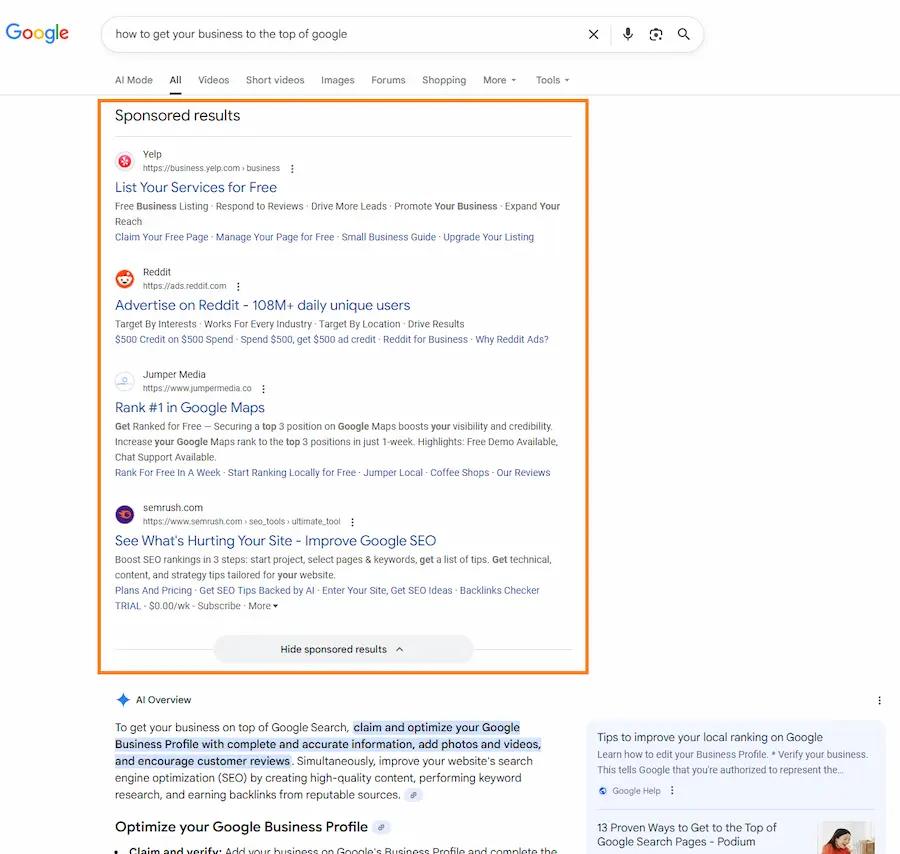
A results page from late 2025: four sponsored listings, then the AI Overview, before a single regular result. Google labels them, but look how much they blend in.
Can You Pay Google to Be at the Top?
You can pay for the ads. You can't pay for anything else. Google says it never accepts payment to be included in search results or to be ranked higher in them, and its Business Profile help page puts it more bluntly: "There's no way to request or pay for a better local ranking on Google."
Money buys the sponsored slots: Google Ads at the top of the results, or Local Services Ads for many home services. Those work, and my team runs them for clients every day. They also stop the minute the budget does. The map pack and the regular results keep sending calls after the work is done, which is why the rest of this guide is about them. If ads are on your list too, start with my Google Ads guide for beginners.
Most of the Work to Get Your Business on Top of Google Is Free
If you're asking how to get your business on top of Google search for free, the honest answer is that most of the levers cost nothing but time. A Google Business Profile is free. Google Search Console is free. Asking happy customers for reviews is free. A better page about your best service is free if you write it yourself.
What isn't free is the hours. The steps below run in the order I'd tackle them for a small business starting from scratch, and the first four don't cost a dime.
Step 1: Figure Out Which Results Your Customers Actually See
A neighborhood dental practice and an online software company fight on completely different results pages. Before you fix anything, work out which page is yours.
Storefronts live or die in the map pack
Restaurants, shops, medical offices and other businesses customers walk into depend on the local map pack. When someone searches "dentist near me," those three pinned businesses take most of the clicks.
Service-area businesses need both rankings
Plumbers, HVAC contractors, movers and roofers go to the customer. They need the map pack for "near me" searches and the regular results for searches like "emergency plumber in Fremont" or "AC repair cost."
Multi-location brands need each branch to stand on its own
A company with several offices has to build authority for the brand while giving every location its own profile and page. Interior designers, medical groups and specialty contractors that cover a whole region usually land here.
Online-only businesses compete in the regular results
E-commerce stores, SaaS products and digital service firms never see a map pack. They win with content that meets the buyer at every stage, from the first question to the comparison right before checkout.
An incognito search on your phone shows you where you stand
Open a private browser window on your phone and search for your main services, with and without your city name. It hides your search history, though Google still knows roughly where you are. Write down:
- Which competitors hold the three map pack spots
- Whether a featured snippet or AI Overview appears
- How many sponsored results sit above everything else
- Where your business shows up, if it shows up at all
It's often humbling. That's the point.
Step 2: Choose Keywords That Bring Buyers, Not Browsers
Search intent is the reason behind a search, and Google reads it well. Miss the intent and even a well-written page won't rank. If search intent is new to you, this table covers the four kinds:
| Intent | Example searches | What Google shows | What to build |
|---|---|---|---|
| Informational | "what is keyword difficulty," "how often to service a furnace" | AI Overviews, featured snippets, People Also Ask | Guides, how-tos, explainers |
| Commercial | "best CRM for small business," "HVAC brands compared" | List articles, review sites, comparison pages | Comparisons and "best of" pages |
| Transactional | "schedule pest control," "buy running shoes online" | Ads, shopping results, service pages | Service and product pages with a clear next step |
| Local | "urgent care open now," "plumber in Fremont" | Map pack, Local Services Ads, local results | Google Business Profile plus location pages |
The four kinds of search intent and the page each one needs.
Google's own results page is the best free keyword tool you have. Type your main service and read the autocomplete suggestions, the People Also Ask questions and the related searches at the bottom. Real people typed those phrases this week.
Then weigh each phrase three ways: how many people search it, how hard the current results are to beat, and whether the person searching is ready to hire someone. A phrase with 50 monthly searches from people ready to book will out-earn a 5,000-search question asked by students. For local work, study "plumber" and "plumber in Fremont" separately. They're different results pages with different competitors.
Step 3: Fill Out Every Field in Your Google Business Profile
For local and service-area businesses, the Google Business Profile (it used to be called Google My Business) decides whether you appear in the map pack at all. Google says local results are mainly based on relevance, distance and popularity. You can't move your building, so relevance and popularity are where the work goes. I've written up the full set of Google Business Profile ranking tactics separately. Start with these:
- Name, address and phone number that match your website exactly
- Primary category: the most specific one that describes what you do
- Secondary categories: every one that genuinely applies
- Services: each one listed, with a short description
- Hours: accurate, holidays included
"Never define your business as a Service Area Business unless you want to disappear completely from the Google Map Pack. Google primarily shows businesses with physical addresses."
David Victor, Boomcycle Digital Marketing
Then keep it alive. Upload real photos of your team, your work and your location. Post updates and offers. Reply to every review. A profile that changes every week looks like a business that's open, and the calls, direction requests and website clicks it collects are part of what Google calls popularity. For the map side in depth, read my guide to getting visibility in the map pack.
Step 4: Earn Reviews Every Month, Not in Bursts
Reviews move the map pack, and they decide whether anyone clicks once you're in it. BrightLocal's Local Consumer Review Survey 2026 of 1,002 U.S. adults found:
- 68% will only use a business with four or more stars, up from 55% in 2025
- 31% will only use a business with 4.5 stars or more
- 47% won't use a business with fewer than 20 reviews
- 74% look for reviews written in the last three months
That last number is the one most owners miss. A pile of reviews from 2022 doesn't help much if nothing new has arrived since summer. Build the ask into your routine:
- Send a short text or email after every finished job with a direct link to your Google review form
- Have your team mention reviews when they wrap up a job, then let the customer decide
- Reply to every review, good or bad, within a couple of days
Two rules keep you out of trouble. Google's policy bans offering incentives of any kind in exchange for reviews, and it bans asking only your happy customers. Ask everyone. Customers can smell the other approach anyway.
Beyond Google, keep your listing accurate on the sites your customers actually use: Yelp and TripAdvisor for restaurants, Angi and Nextdoor for home services, industry directories for B2B. Skip the hundred free directories nobody reads.
One San Ramon Business Grew After Its Biggest Neighbor Left

When Chevron moved its headquarters out of the San Ramon area, the local market filled up with empty office space. Executive Base Network had to win renters in that glut. Read how we helped Executive Base Network grow.
Step 5: Give Every Service Its Own Page Worth Ranking
One "Services" page with a bulleted list doesn't rank for anything. Every service you want calls for needs its own page that explains what you do, how it works and why someone should pick you.
Your page has to say why you and not the other 50
Hardly anyone answers that last question. What's your unique selling proposition? Write in your customers' words, not your trade's jargon, and prove it instead of claiming it:
- Testimonials with real names and photos
- Before-and-after photos of actual jobs
- Short case examples with specific results
- Licenses, certifications and warranties, with a line on what each means to the customer
Title tags, descriptions and URLs tell Google what the page is for
- Title tag: the blue headline in the results. Put the service and city first and your business name last, as in Water Heater Replacement in Pleasanton, CA followed by your company name. The words people see before Google cuts it off matter most.
- Meta description: the snippet under the headline. Google doesn't rank on it, but it decides whether people click. Lead with a specific benefit and keep it around 155 characters.
- URL: short and readable.
/services/water-heater-replacement-pleasanton/beats/page?id=4712. Use hyphens, not underscores.
Use one H1 for the page title, H2s for the main sections and H3s inside them. Link related pages to each other with plain descriptive anchor text, and build a main page for each topic that connects to the smaller pages around it. My guide to search engine optimization goes deeper on each of these.
Step 6: Build Location Pages a Competitor Couldn't Copy
If you serve several cities, each one needs its own page. This is where most businesses go wrong. They copy one page twenty times, swap the city name and wait. Google sees through that right away.
A real location page carries things no other business in that city could paste in:
- Neighborhoods and landmarks near jobs you've done
- Local conditions that change the work, like weather, soil, permits or codes
- Reviews from customers in that city
- Photos of jobs you finished there
- Why you serve that area and what you know about it
For a roofer, that means the weather each town actually gets. For a medical group, it means the doctors and services at each office.

Service-area businesses and storefronts need different kinds of city pages.
Step 7: Answer the Questions People Ask Google
Featured snippets sit above the first regular result. People Also Ask boxes stack related questions under it, and each one is another spot your business can take. When Google quotes your answer, searchers read it as an endorsement.
The format that wins depends on the question:
| Question type | Example | Format that tends to win |
|---|---|---|
| Definition | "What is keyword difficulty?" | One 40 to 60 word paragraph right under the heading |
| Process | "How do I set up Google Analytics?" | A numbered list of steps |
| Comparison | "SEO or PPC, which is better?" | A side-by-side table |
| How long or how much | "How long does SEO take?" | A direct answer in the first sentence, then the detail |
Match the answer's shape to the question's shape.
Look at the People Also Ask questions for your main searches, note how long the winning answers are, and write a better one in the same shape. Owning a People Also Ask spot for a supporting question can send more traffic than ranking third for the main phrase.
Step 8: Get Your Business Cited in AI Overviews and AI Answers
Those AI answers cost the top result clicks, but they still cite sources, and a cited source gets seen by everyone who reads the answer. The same goes for ChatGPT and Google's AI recommending local businesses.
"LLMs like ChatGPT or Google's AI Overviews are lazy shoppers who love 'Best of' listicles because they bundle popular options into easy recommendations. The result is a self-reinforcing loop where brands that already have visibility keep getting cited, while smaller alternatives stay invisible."
David Victor, Boomcycle Digital Marketing
The pages that get cited tend to share a few traits:
- They answer the question and the next question a buyer would ask
- Their headings say exactly what each section answers
- They link to primary sources for every number
- A named, qualified person wrote them
- They've been updated recently
Brand searches matter here too. When more people search your business by name, Google treats you as a real, trusted company. Press coverage, local news mentions and an active presence where your customers spend time all feed that.
Step 9: Earn Local Links and Mentions
Links from reputable sites still tell Google which businesses deserve to rank, and mentions of your name without a link help too. For a small business, the best ones are usually close to home. The Little League team you sponsor probably lists sponsors on its website. Your trade association has a member directory. A realtor and a home inspector, or a roofer and a gutter installer, can send each other customers and link to each other while they're at it.
"As backlinks go, your local Chamber of Commerce membership backlink is geographically relevant and certainly worth three or four hundred bucks a year."
David Victor, Boomcycle Digital Marketing
Join the Chamber in every city that matters to you. Then give other sites a reason to mention you: a seasonal home maintenance checklist that local realtors hand to buyers, or a cost calculator a trade blog wants to share. Each good link makes the next one easier.
Social media won't lift your rankings directly. Your profiles do tend to show up when people search your name, though, and posts about finished projects get seen by local people who may link to you later.
Step 10: Show Google and Customers Who Stands Behind the Business
Google's quality raters judge pages on E-E-A-T: experience, expertise, authoritativeness and trust. You show those on your own site.
Your About page shouldn't be an afterthought. Put specifics on it:
- The year you started and how the business began
- Licenses, certifications and memberships, with what each means to a customer
- How many customers or projects you've handled
- Named people with real credentials, not "our team of experts"
Blog posts need an author bio that says why that person knows the subject. "David Victor has been doing SEO since 2003" tells Google more than "the Boomcycle team." Around the site, make your phone number, address and email easy to find, show reviews with real names, and put certifications where visitors can see them, not buried in the footer.
Step 11: Fix the Technical Basics That Hold Everything Back
None of the steps above work on a site Google can't load, read or index. Check these first:
- HTTPS on every page
- A site that works on a phone, because Google uses the mobile version of your site for indexing and ranking
- Your important pages indexed, confirmed in Google Search Console, with an XML sitemap submitted
- Core Web Vitals in good shape
Core Web Vitals measure how fast a page loads, how quickly it responds to a tap and how much it jumps around while loading. Google says it highly recommends good Core Web Vitals for success with Search. Run your main pages through PageSpeed Insights. The usual culprits are oversized photos, scripts that block the page from showing, and cheap hosting. Most fixes don't need a new website.
Step 12: Turn Searchers Into Calls and Form Fills
A top ranking that doesn't ring the phone is a trophy, not a result. Every page should answer three questions within a few seconds:
- What do you do?
- Why should I trust you?
- What should I do next?
Put a tap-to-call phone number in the header of every page. Keep forms down to the fields you truly need. Show reviews, guarantees and real photos near the button. Then test it all on your own phone, since that's where a lot of local customers will find you. Can someone call with one tap and fill out the form with a thumb?
Step 13: Measure Leads, Not Rankings
Rankings and domain scores feel good and pay nothing. Watch the visibility numbers, but judge the work by what reaches your inbox and phone.
On the visibility side, track organic traffic split into branded and non-branded searches, your map pack positions, and which searches show your business in snippets or AI Overviews. On the money side, count phone calls, form submissions, quote requests, direction requests and online sales that came from search.
Set up conversion tracking in Google Analytics 4, use call tracking if the phone matters to you, and connect leads to your CRM so you can see which searches turn into your best customers.
How Long Does It Take to Get to the Top of Google?
Months, not weeks. Google itself warns that no one can guarantee a #1 ranking on Google, so be wary of anyone who promises one.
How long it takes depends on where you're starting, who you're up against and how much work goes in. An established local business that cleans up its Business Profile and starts collecting reviews can move in the map pack within weeks. A new site chasing competitive phrases in a big city usually needs six to twelve months to gain real ground. "Personal injury lawyer in New York City" and "family dentist in a small Iowa town" are not the same climb.
Why it's worth the wait: ads stop the day you stop paying, and organic rankings don't. Every page, review and link you add stays put and builds on the last one.
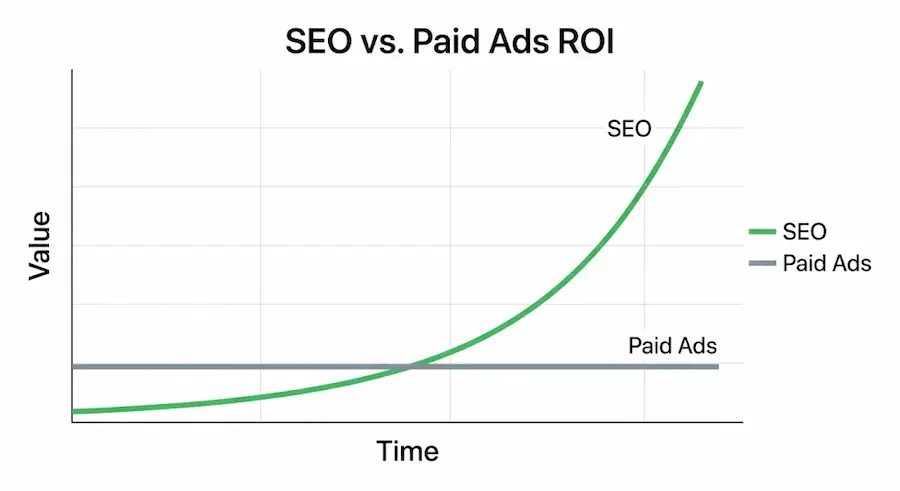
Illustration: ads return the same thing every month you pay for them, while organic work keeps adding up.
Some of This You Can Do Yourself, and Some Is Worth Hiring Out
Plenty of owners handle the first few steps on their own. Others run out of hours, not ability. Here's how I'd split it:
| Good to do yourself | Worth hiring a professional |
|---|---|
| Claiming and filling out your Google Business Profile | Technical SEO audits and fixes |
| Asking customers for reviews | Writing and publishing content at volume |
| Writing service and location page copy | Link building |
| Publishing helpful blog posts | Google Analytics 4 and call tracking setup |
| Keeping directory listings accurate | Ongoing conversion rate testing |
Where an owner's time goes furthest, and where a specialist saves months.
The real question isn't whether you could learn it. It's whether those hours are worth more spent running your business. Before you decide, see what the businesses already ranking above you are likely spending with my free marketing investment calculator.
Start with the step that fits your business type. If you'd rather hand the climb to someone who's done it since 2003, here's how our SEO services work, and for the map pack specifically, our local SEO and Google Maps service.