
If you ran a Performance Max campaign in 2024 and haven’t touched the settings since, you’re flying blind with a cockpit full of new instruments you don’t know exist.
Google rolled out more transparency and control features for PMAX in 2025 than in the previous three years combined. Campaign-level negative keywords. Full search terms reports. Channel-level performance breakdowns. Asset-level data. Demographic controls. These aren’t incremental tweaks. They change how you should think about optimization from the ground up.
But most business owners we talk to either don’t know these tools exist or aren’t sure how to use them without accidentally strangling the algorithm that makes PMAX work in the first place. My 2026 guide walks through what changed, what matters, and exactly how to put it to work for a home services or professional services business.
The Signals You Feed the Algorithm Matter More Than Anything Else
Performance Max is only as smart as the data you hand it. Give it sloppy conversion tracking and vague audience signals, and it will spend your budget chasing low-quality clicks across Display and YouTube placements that never turn into phone calls or booked appointments.
Start with your conversion setup.
If you’re a plumber, a roofer, an attorney, or a financial advisor, you need to track the actions that actually generate revenue: form submissions, phone calls, initiated chats and booked consultations.
Not page views. Not time on site. Not even video views.
Every conversion action you tell Google to optimize toward shapes where your money goes.
Enhanced Conversions for Leads deserves special attention. This feature uses hashed first-party data (like the email address a prospect submits on your contact form) to match conversions back to the ad click that started the journey, even when cookies get blocked.
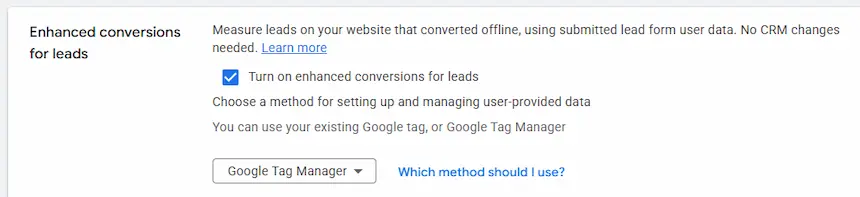
For service businesses with longer sales cycles where a lead might not close for days or weeks, this is the difference between Google’s AI optimizing toward real revenue and optimizing toward junk.
If you serve clients in the UK or EU, you’ll also need Consent Mode v2 properly implemented. Without it, the algorithm loses visibility into a chunk of your conversions and starts making decisions with incomplete data. Also, we do not advise using this feature with HIPAA-compliant clients (too many ways for this to go sideways!)
The businesses that win with PMAX treat conversion architecture like the foundation of a house. Everything else you build sits on top of it. Skip it, and the rest of your optimization work tilts sideways. If you’re unsure whether your current Google Ads setup tracks the right actions, that’s the first thing to fix.
Campaign Structure: How to Organize Without Over-Complicating
The biggest structural mistake we see with service businesses running PMAX? Either cramming everything into a single campaign with one asset group, or splitting things into so many campaigns that none of them get enough conversion data to optimize properly.
Here’s the principle: each PMAX campaign needs roughly 30 conversions per month to learn effectively. For a local HVAC company or a law firm generating 40 to 80 leads a month, that usually means one or two campaigns, not ten.
A practical structure for most service businesses looks like this:
- Campaign 1: Core services. Your bread-and-butter offerings. For an HVAC company, that’s installations and replacements. For a law firm, your primary practice areas. This campaign gets the lion’s share of your budget.
- Campaign 2 (optional): Secondary or seasonal services. Maintenance plans, emergency calls, or a specific practice area you want to grow. Only split this out if Campaign 1 generates enough conversions to stand on its own after the budget reallocation.
Within each campaign, organize your asset groups by theme. An asset group for “AC installation” gets headlines, descriptions, images, and audience signals that all point toward that service. A separate asset group for “furnace replacement” gets its own set. This gives the algorithm clear, distinct signals about what each group of ads should accomplish.
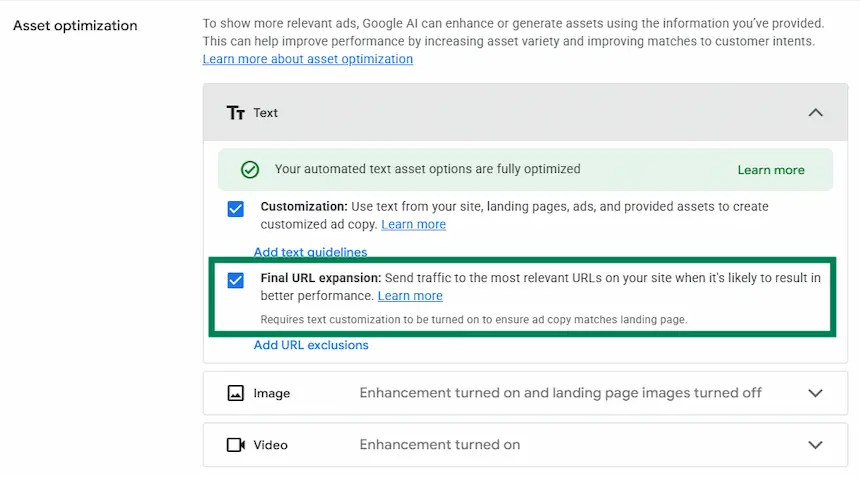
URL expansion is on by default and it’s one of the first settings to evaluate. When enabled, Google can send ad traffic to any page on your website, including your blog, your careers page, or your privacy policy. For most service businesses, that’s a problem. Turn it off if you have dedicated landing pages for paid traffic, or at minimum, use URL exclusions to block pages that have no business receiving ad clicks.
The New Negative Keywords: Guardrails, Not Micromanagement
This is the update that generated the most buzz. In early 2025, Google expanded PMAX negative keywords from a laughable cap of 100 per campaign to 10,000 and made them self-serve directly in the Google Ads interface. No more begging a Google rep to add them for you.
The temptation is obvious. You open your search terms report, see a keyword that hasn’t converted, and add it as a negative. Repeat a hundred times. Feels productive.

It’s also how you accidentally gut your campaign’s ability to find new customers.
PMAX was built to discover converting audiences across channels. When you aggressively prune every search term that hasn’t converted yet, you starve the algorithm of the exploration data it needs to improve over time. We’ve seen it firsthand in our Google Ads management work: accounts where a previous manager added hundreds of negatives and the campaign quietly stopped growing.
- A search term is for a service you flat-out don’t offer. If you’re a residential electrician, block “commercial electrical contractor” and “industrial electrician.”
- A term belongs to another campaign in your account. If you run a separate branded search campaign, exclude your brand name from PMAX so the two don’t compete.
- The intent is clearly wrong. Terms containing “jobs,” “salary,” “DIY,” “free,” “login,” or “download” almost never convert for service businesses. Block those without hesitation.
The right approach is to use negatives as guardrails. Add them when:

What you should not do is block a keyword simply because it hasn’t converted in two weeks. Some search terms take time. A homeowner searching “how much does a new roof cost” today might call you in three weeks. Give the algorithm room to work.
Channel Reporting: Finally See Where Your Money Actually Goes
For years, the biggest complaint about PMAX was that you couldn’t see how your budget split across Search, Shopping, Display, YouTube, Gmail, Discover, and Maps. You just poured money in and hoped for the best.
That changed. Google now provides channel-level performance reporting that breaks down spend, conversions, and cost-per-conversion by inventory type. It’s still rolling out account by account (not every account has it yet, particularly outside the US), but if you have access, it’s one of the most valuable diagnostic tools available.
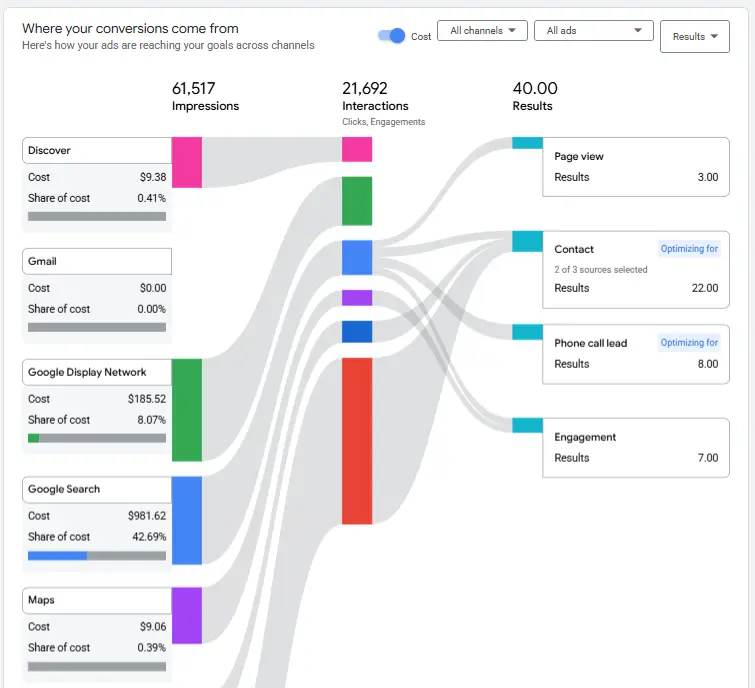
Here’s what to look for. If you’re a service business generating leads, your conversions should come primarily from Search and Maps placements. If you see a disproportionate chunk of spend going to Display with minimal conversions to show for it, that’s a red flag.
You can’t directly reallocate budget between channels inside PMAX, but you can influence the split by adjusting your creative assets. Removing image assets, for example, reduces the campaign’s ability to serve Display ads, which forces more spend toward Search.
This kind of diagnostic work is exactly what separates a well-managed PMAX campaign from one that’s just running on autopilot. It’s also why regular monitoring matters so much.

If you haven’t looked at your channel breakdown, you might be funding impressions on the Google Display Network that do nothing for your bottom line. Our article on retargeting ads covers how display placements can work when used intentionally, but inside PMAX, they often become a budget leak when left unchecked.
Creative Assets: What the Algorithm Needs From You
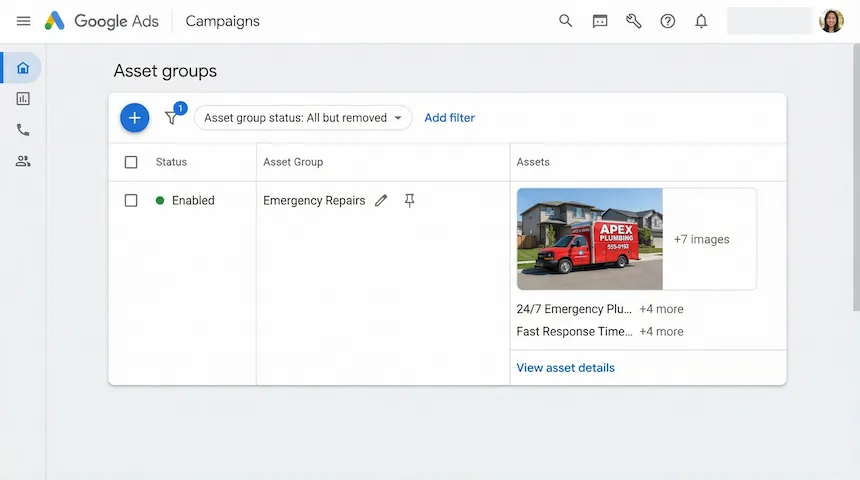
Google’s AI assembles your headlines, descriptions, images, and videos into ad combinations tailored to each placement and audience.
Your job is to give it enough high-quality raw material to work with.
“Enough” means filling every available slot. That’s 15 headlines, 5 long headlines, 5 descriptions, and up to 20 images. Add video if you have it. Add your logo and business name (now required for all new PMAX campaigns). Add sitelinks. The more complete your asset library, the more combinations the algorithm can test.
But volume alone doesn’t cut it. Google rates each asset’s performance as “Best,” “Good,” “Low,” or “Pending.” The 2025 updates now show impression, cost, and conversion data at the individual asset level, which means you can see exactly which headline or image pulls its weight and which doesn’t.
Build a refresh habit around this data:
- Weekly: Check asset performance ratings. Flag anything rated “Low” for two consecutive weeks.
- Every two weeks: Swap out two or three underperforming assets with new variations. Test different angles. If “24/7 Emergency AC Repair” isn’t performing, try “Same-Day AC Service, No Weekend Fees.”
- Monthly: Do a bigger creative refresh. Update imagery for the season. Align messaging with any promotions or offers you’re running.
One stat worth knowing: Google reports that improving your Ad Strength from “Poor” to “Excellent” produces a median 6% increase in conversions at a similar cost per action. That’s not a massive leap from any single change, but compounded over months of systematic asset management, it adds up.
Late 2025 also brought Gemini-powered creative generation into PMAX. The AI can now suggest and even auto-generate asset variations based on your existing content. It’s useful for getting a first draft of new headlines, though you should always review and edit what it produces. Auto-generated creative tends to be generic. Your competitive edge comes from specifics that only you know: your service area, your guarantees, your response times.

Audience Signals: Teach the Algorithm Who Your Customers Are
Audience signals in PMAX are suggestions, not hard targeting. You’re telling Google, “Here’s the kind of person who typically hires us. Start here and expand from there.” The quality of those starting suggestions has an outsized impact on how quickly your campaign finds its footing.
The hierarchy matters. Not all signals carry equal weight:
- Customer Match lists are the most powerful signal. Upload a list of past customers’ email addresses. Google finds users who resemble them. For a professional services firm with years of client data, this is gold.
- Website visitor audiences come next. People who visited your contact page or service pages already showed intent. Point the algorithm toward them.
- Custom intent audiences let you target people based on recent Google searches. Enter the search terms your best customers typically use before they call you.
- Google’s in-market and affinity audiences are the broadest signal. Useful for scale, but they should supplement your first-party data, not replace it.
A strong approach for service businesses: create separate asset groups with layered signals. One asset group targets high-intent converters (past customers plus contact page visitors). Another targets people actively researching your services (custom intent audiences built from your top-performing search terms). A third targets broader interest categories for discovery. This gives the algorithm distinct learning paths instead of one muddled pool of signals. If you want to go deeper on how audience layers work together in Google Ads, we covered the mechanics in our piece on audience layering.
Search Themes, introduced in 2025, give you another lever. You can add up to 25 search themes per asset group. Think of these like broad match keywords that tell the algorithm what topics matter for each group. For a pest control company, search themes might include “termite inspection,” “rodent removal,” and “bed bug treatment.” Keep them broad enough to let the AI explore, but specific enough to stay relevant.
Measurement: Three Layers of Truth of Performance Max Campaigns
One of the trickiest parts of PMAX for service businesses is knowing whether it’s actually working or just claiming credit for conversions that would have happened anyway. This is a real problem, not a theoretical one. PMAX includes view-through conversions in its default reporting, which means someone might see a Display ad, never click it, and then call you a week later after finding you on Google Maps. PMAX counts that as its conversion.
Build your measurement around three layers:
Layer 1: What Google reports. Conversions, cost per lead, ROAS (though for service businesses, ROAS is often the wrong metric to optimize around). Use these numbers for day-to-day optimization but treat them as directional, not absolute truth.
Layer 2: Cross-campaign impact. Watch what happens to your branded search volume when PMAX is running versus paused. Track new-versus-returning customer ratios. If PMAX claims 50 conversions a month but your total lead volume hasn’t actually increased, the campaign may be cannibalizing other channels rather than driving incremental business.
Layer 3: Business-level validation. This is the ground truth. Are you getting more phone calls? Are more estimates being booked? Is revenue growing? Compare total business outcomes month over month, not just what the Google Ads dashboard says.
The Google Ads Help Center has a useful walkthrough on evaluating PMAX results using the Insights page, performance shifts, and the explanations tool. It’s worth bookmarking.
A Weekly Optimization Routine That Actually Works
Sporadic, major overhauls hurt PMAX campaigns more than they help. Every time you make a big structural change, the algorithm re-enters its learning phase and performance dips for one to two weeks. Consistent, smaller adjustments work better.
Here’s a weekly cadence built for service businesses:
Monday: Data review. Check performance against your targets. Look at spend distribution across asset groups. Identify any sudden spikes or drops.
Tuesday and Wednesday: Asset work. Review asset-level performance ratings. Replace underperformers. Write new headline or description variations based on what’s working.
Thursday: Audience and signal refinement. Update customer match lists if you have new client data. Review which audience signals drive the best results. Adjust search themes if certain topics consistently underperform.
Friday: Strategic analysis. Pull the search terms report. Add any clear negatives (services you don’t offer, wrong-intent queries). Check the channel breakdown if available. Review landing page performance and exclude URLs that eat budget without converting.
This routine takes a few hours per week for a single campaign. Skip it for a month and you’ll find budget leaking in places you didn’t expect.
Scaling: The 20% Rule
When a PMAX campaign performs well and you want to spend more, resist the urge to double the budget overnight. A sudden budget increase throws the algorithm back into learning mode, which typically spikes your cost per lead by 25% to 50% for the first two weeks.
The proven approach: increase your budget by 10% to 20% every seven to fourteen days. This gives the AI room to expand into new auctions gradually without losing the performance patterns it already learned.
During any scaling phase, monitor daily. If your cost per lead rises more than 20% above target for five consecutive days, pause the increase and let performance stabilize before pushing further. And never change your bidding target and your budget at the same time. If something breaks, you won’t know which change caused it.
New Customer Acquisition: Stop Paying for People Who Already Know You
By default, PMAX loves to show your ads to people who have already visited your website or are already searching for your brand name. These are the easiest conversions, so the algorithm gravitates toward them. The problem is obvious: you’re paying for customers who would have found you anyway.
Google now offers two customer acquisition modes inside PMAX:
- New Customer Value mode adds extra conversion value for first-time customers, encouraging the algorithm to weight them more heavily while still serving returning visitors.
- New Customer Only mode restricts the campaign to people who haven’t purchased from or contacted you before.
For service businesses focused on growth, upload a comprehensive customer match list (every client from the past two or more years) and enable one of these modes. Pair it with a separate branded search campaign that handles people already looking for you by name. This way, PMAX focuses its energy on finding people who’ve never heard of your business, which is where the real growth happens.
Real-World Results: What Good PMAX Management Looks Like
We’ve seen firsthand how proper campaign architecture and disciplined optimization translate into real revenue. In one of our Google Ads management engagements, we took over an account that had been mismanaged by a previous agency. No transparency, no regular reporting, and campaign settings that hadn’t been touched in months. After restructuring the campaigns, tightening conversion tracking, and implementing the kind of weekly optimization routine described above, the account generated over $200,000 in attributed sales.
The pattern repeats across accounts we manage. The gains don’t come from one magic setting. They come from doing the fundamentals right, consistently: clean conversion tracking, intentional campaign structure, regular asset refreshes, and strategic use of the new negative keyword and reporting tools that Google has made available.
What’s Coming Next
Google has signaled several features expected to mature through the rest of 2026. AI-generated video and image creation directly inside PMAX is in testing, which could reduce the creative production burden significantly. Predictive audience modeling will let the algorithm identify likely converters earlier in the buying journey. And the integration of AI Max technology from Search campaigns into PMAX suggests even tighter AI-driven matching between user intent and ad delivery.
For service businesses, the practical takeaway stays the same: the advertisers who feed the algorithm the best data, provide the strongest creative inputs, and use the new control tools with discipline will outperform those who set a campaign and forget it.
If your PMAX campaigns aren’t delivering the lead quality or volume your business needs, or if you’re not sure whether the latest features are set up correctly in your account, reach out to our team. We’ll take a look under the hood and tell you exactly where the opportunities are.